Curriculum (9 Modules) Runtime Architecture Simulators & Diagnostics Interview Matrix Engineering Credentials Spatial Infographics FAQ Privacy Policy Install via Google Play ↗
SPATIAL COMPUTING & XR SYSTEMS ARCHITECTURE • AIR-GAPPED RUNTIME

Master Augmented Reality.
From Spatial Math to Production OpenXR.

The premier offline engineering platform for XR developers, robotics engineers, and spatial computing architects. Master 6-DoF Visual-Inertial Odometry, diagnose real-time tracking pipelines, conquer FAANG-grade technical interviews, and earn verifiable industry credentials.

Air-Gapped Local Architecture
Zero Telemetry & Private
Deterministic Simulators
⚡
AR Architecture • Level 04
1,060 XP • 7-Day Precision Streak
🧭
Visual-Inertial Odometry
60 FPS Real-Time SLAM Pipeline
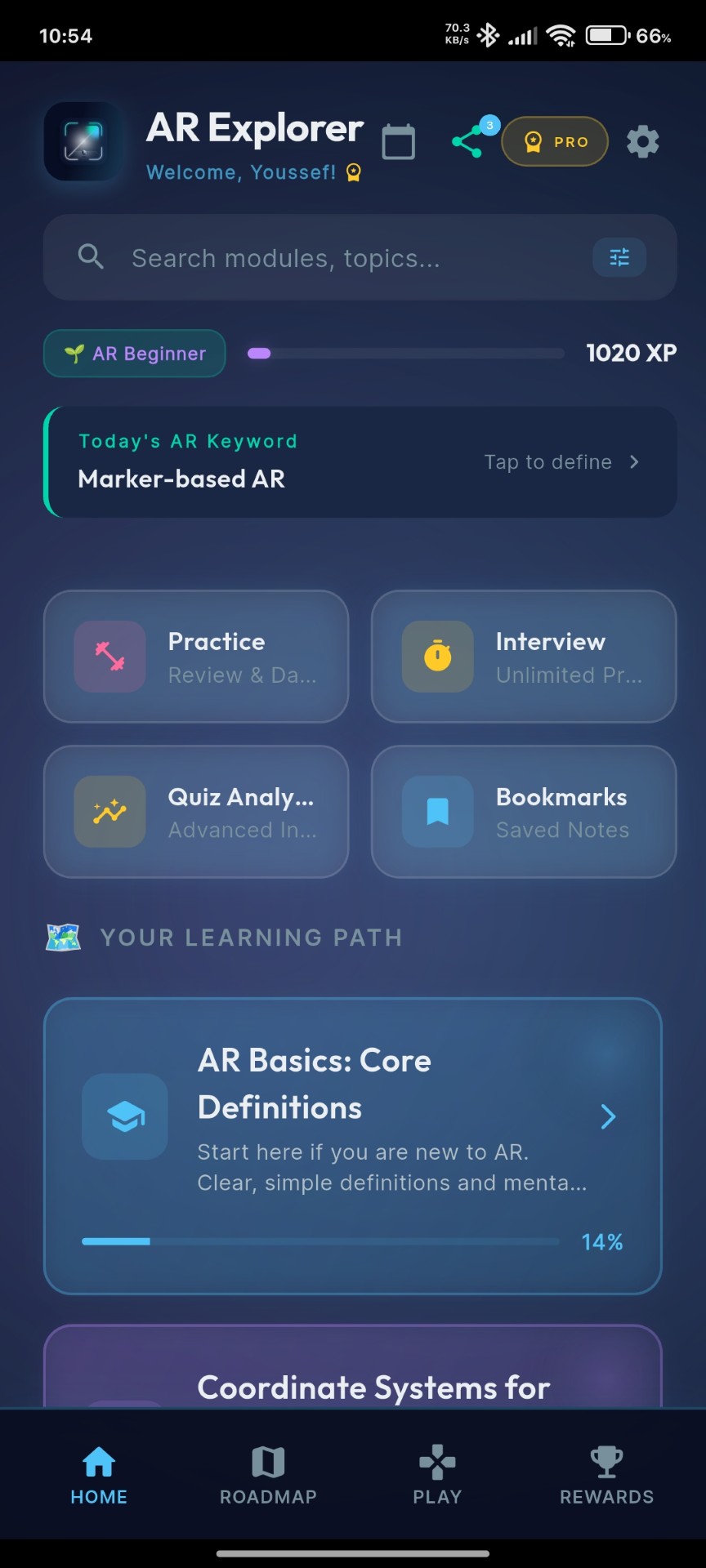
AR Explorer Home Screen
9
Engineering Modules
50+
XR Systems Challenges
4
Hardware Simulators & Sandboxes
100%
Air-Gapped & Sovereign Data

Comprehensive Spatial Computing Curriculum

Standardized against Khronos Group specifications, academic computer vision literature, and technical interview benchmarks from Meta Reality Labs, Apple Vision Products, and Niantic.

Engineered around industry standards, academic foundations, and real technical interviews at top spatial computing firms.

Module 0 • Fundamentals

AR Basics: Core Definitions

Clear mental models without noise: Ronald Azuma's 3 Pillars of AR, Optical See-Through (OST) vs Video See-Through (VST).

  • What Is Augmented Reality?
  • AR vs VR vs MR vs XR Defined
  • Real-World Production Examples
Module 1 • Mathematics

Coordinate Systems for AR

Master the spatial math essential for XR: World frame, Camera frame, Local frames, Quaternions, and 4×4 affine transformation matrices.

  • Left-Handed vs Right-Handed Conventions
  • Euler Angles & Gimbal Lock
  • Quaternion Math & Pose Representation
Module 2 • Foundations

Strategic AR Foundations

Architectural principles of tracking, digital registration, camera calibration, and the hardware constraints of modern spatial headsets.

  • Environmental Anchors & Persistence
  • Field of View (FOV) & Eye Relief
  • Spatial Perception & Depth Cues
Module 3 • Deep Tech

SLAM & Technical Concepts

Simultaneous Localization and Mapping under the hood. Visual-Inertial Odometry (VIO), Kalman Filtering, Bundle Adjustment, and the AR Cloud.

  • Monocular vs Stereo vs VIO SLAM
  • Loop Closure & Relocalization
  • AR Cloud & Multi-User Shared Anchors
Module 4 • SDKs & Standards

Development: OpenXR, ARCore & ARKit

The Khronos OpenXR standard, cross-platform Unity AR Foundation, native iOS ARKit, and Android Google ARCore APIs compared in detail.

  • OpenXR Runtime & Extension Architecture
  • Plane Detection & Hit-Testing Pipelines
  • Feature Matrix: ARCore vs ARKit
Module 5 • UX & Interaction

Spatial UX & Design Systems

Designing interfaces for 3D space: Ergonomic comfort zones, vergence-accommodation conflict, gaze interactions, and spatial audio cues.

  • 3D UI Scale & Billboarding Rules
  • Gesture Mechanics & Hand-Tracking
  • Reducing Spatial Fatigue & Motion Sickness
Module 6 • Optimization

Stability & 60 FPS Deep Dive

Production profiling: Thermal throttling, draw-call budgets, occlusion culling, tracking drift mitigation, and GPU rendering pipelines.

  • 16.6ms Render Budget Architecture
  • Diagnosing & Fixing Anchor Drift
  • Lighting Estimation & Real-time Shaders
Module 7 • Mobile Engineering

Implementing AR in Flutter

Bridging Flutter with native AR capabilities: Android PlatformViews, iOS UiKitView, MethodChannels, and reactive state management.

  • Flutter AR Platform Channel Architecture
  • Managing Camera Lifecycle & Memory
  • Overlaying 2D UI on 3D Camera Feeds
Module 8 • Web & Instant AR

Google AR Viewer & WebXR

Frictionless 3D previews: Android Scene Viewer intents, Apple Quick Look USDZ integration, and the modern browser WebXR Device API.

  • Google Scene Viewer Intent Protocols
  • glTF / GLB vs USDZ Asset Workflows
  • Instant AR Deployment for E-Commerce

Engineered for Deep Technical Rigor

Inspect real telemetry, structured lesson readers, and diagnostic sandboxes directly from the production Android client.

Real-Time Simulation Sandboxes & Diagnostics

Bridge theoretical mathematics with real-world spatial execution. Validate sensor fusion algorithms, inspect camera frame buffers, and simulate 60 FPS mobile constraints inside dedicated interactive sandboxes.

Pipeline Inspection

AR Scene Diagnostics & Triage

Diagnose common spatial tracking failures in real-time: black camera feeds, sensor permission deadlocks, depth buffer mismatches, and severe anchor drift under feature-sparse environments.

// Scenario: Camera Feed Black Screen & Pipeline Stalls
if (!ARSession.isSupported) fallback2D();
session.requestCameraPermission().then(initPoseBuffer);
Sensor Fusion

Visual-Inertial Odometry & SLAM Simulator

Visualize FAST corner extraction, optical flow vectoring, and Kalman-filtered IMU dead-reckoning. Discover how keyframe triangulation and loop closure enforce drift-free tracking.

// Extended Kalman Filter (EKF) Sensor Fusion
Eigen::Matrix4d pose = EKF.update(opticalFlow, imuDelta);
map.triangulateKeyframePoints(pose);
Hardware Abstraction

Production SDK Implementation (Unity, OpenXR, C#)

Implement production code directly on mobile: bind Vuforia DefaultObserverEventHandlers, configure ARKit ARWorldTrackingConfigurations, and resolve Google Cloud Anchors asynchronously.

public class MarkerHandler : DefaultObserverEventHandler {
  protected override void OnTrackingFound() { BindPoseAnchor(); }
}
Spatial Kinematics

Coordinate Transformer & Raycasting Sandbox

Calculate raycast hit-test planes, calculate camera-relative Euler-to-Quaternion transformations, and tune spatial interaction thresholds within strict 16.6ms frame budgets.

Vector3 targetAnchor = raycastHit.pose.position;
Quaternion orientation = Quaternion.LookRotation(cameraDir);
Instantiate(spatialPrefab, targetAnchor, orientation);

Benchmark Against
XR Engineering Standards

Over 50 rigorously engineered assessment scenarios covering real-time computer vision, epipolar geometry, quaternion kinematics, and mobile frame-budget constraints.

✓
Timed Assessment Engine

5-minute challenge evaluation windows with latency penalty tracking and proof-of-work validation.

✓
Multi-Domain Accuracy Radar

Granular benchmarking across SLAM, sensor fusion, spatial audio, and cross-platform OpenXR.

✓
Algorithmic Proofs & Spaced Repetition

In-depth mathematical rationales including Quaternion SLERP derivations and transform matrices.

⚡ AR Technical Interview • Q3/10
04:32
What is the primary mathematical reason quaternions are favored over Euler angles in 3D spatial tracking?
A They consume less memory on mobile GPUs
B They avoid Gimbal Lock and interpolate smoothly (SLERP)
C They require zero matrix multiplication
D They are natively executed in hardware by IMUs
✓ Correct Explanation: Quaternions represent 3D orientation without Gimbal Lock (loss of a degree of freedom when axes align) and provide seamless Spherical Linear Interpolation (SLERP) for smooth camera poses.

Tiered Spatial Computing Engineering Credentials

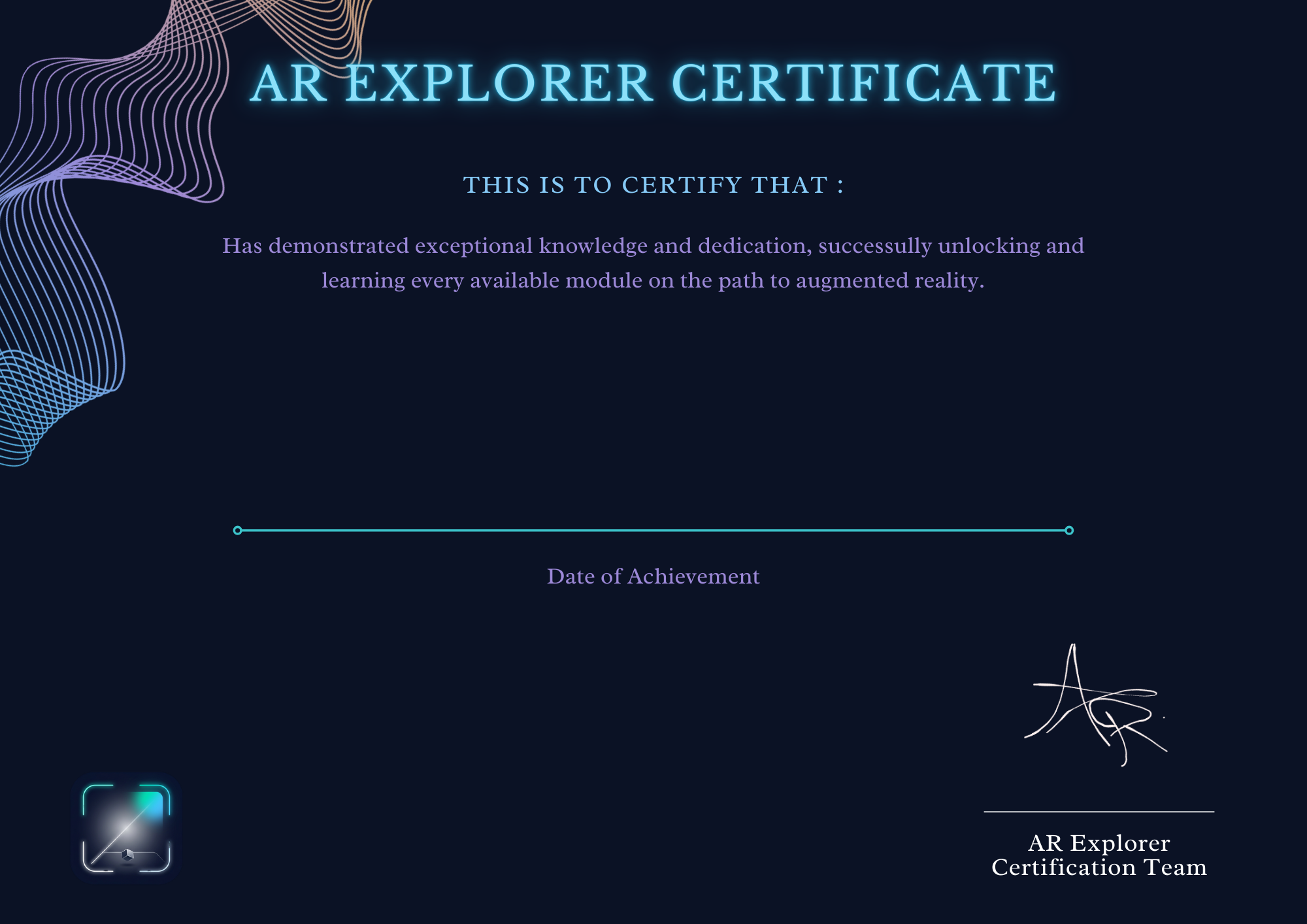
Validated proof of technical competence. As you complete modules and conquer interview challenges, unlock cryptographically verifiable credentials exportable as high-resolution vectors and PDFs for engineering portfolios.

AR Explorer Certificate of Achievement

Tiered Certification System

Unlike generic course certificates, AR Explorer credentials require passing practical code challenges, high-score quiz requirements, and timed interview questions.

PT
Platinum Tier • Principal Architect

100% Curriculum + All Lab Challenges Cleared

1,500+ XP
AU
Gold Tier • Senior AR Engineer

Advanced Modules + Interview Simulator Passed

1,000+ XP
AG
Silver Tier • AR Developer

Core Foundations + Code Challenges Complete

600+ XP
CU
Bronze Tier • Foundation Specialist

Basics & Coordinate Systems Mastery

250+ XP

High-Fidelity Spatial Infographics

Complex topics visualized with clarity. Click on any infographic below to view high-resolution diagrams directly from the application.

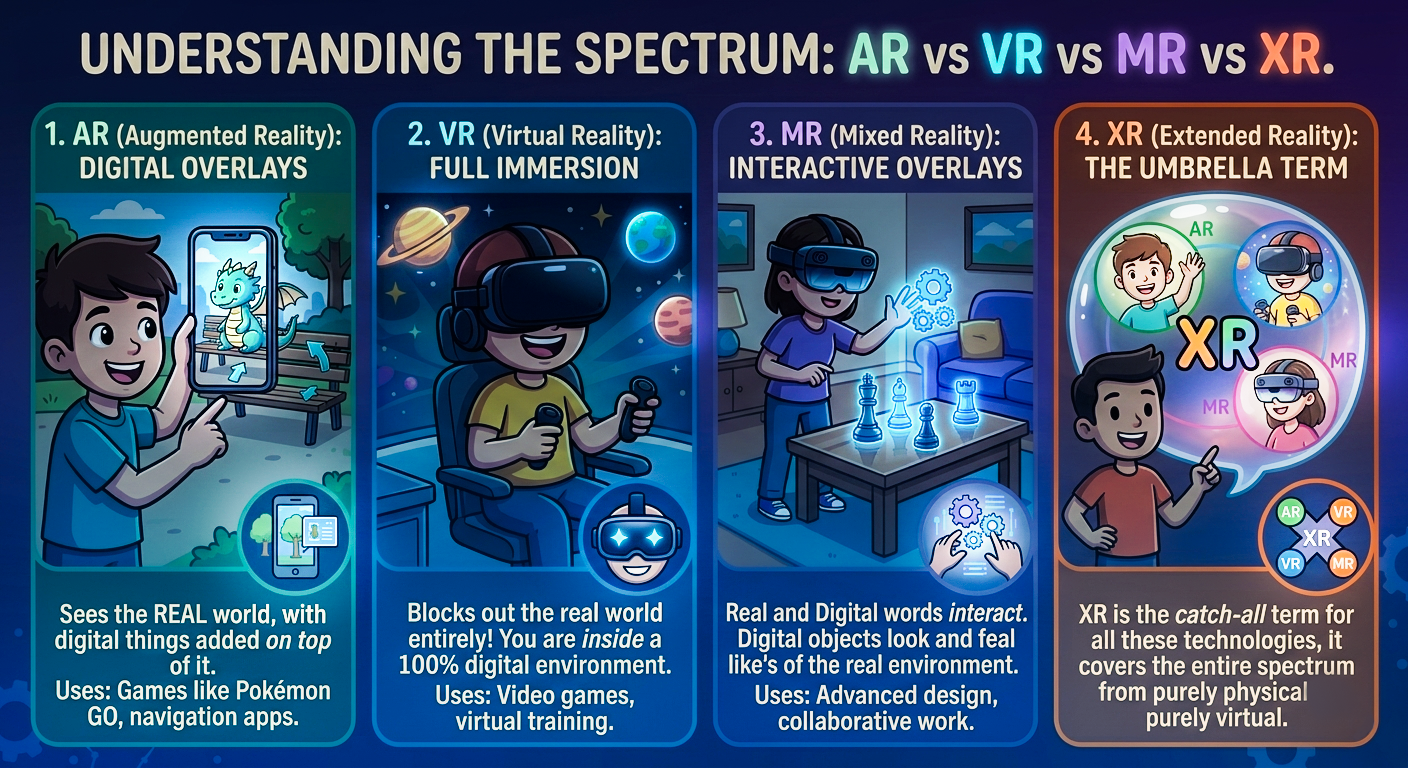
AR vs VR vs MR spectrum
The Reality Spectrum

Milgram-Kishino Continuum: AR vs VR vs MR vs XR.

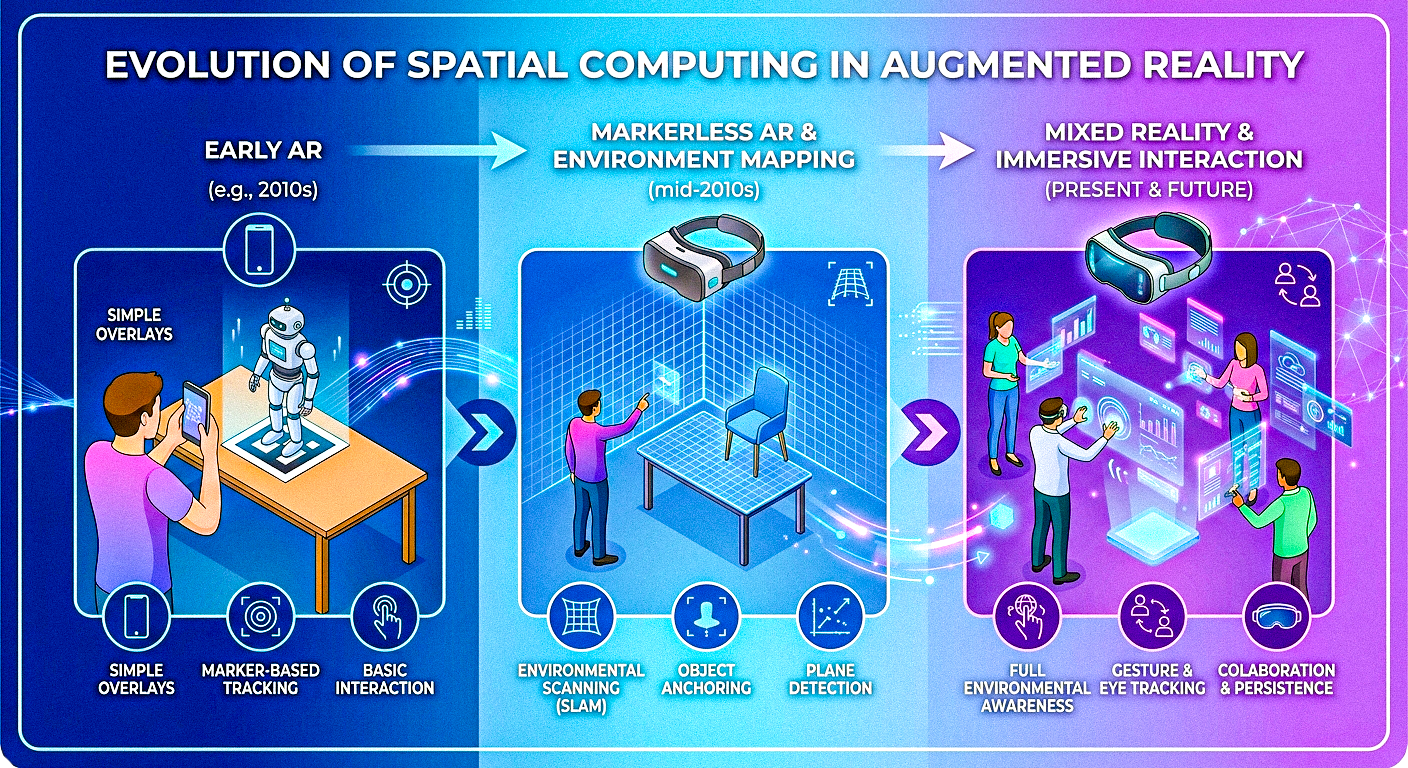
Evolution of Spatial Computing
Evolution of Spatial Tech

From Ivan Sutherland's Sword of Damocles to Vision Pro.

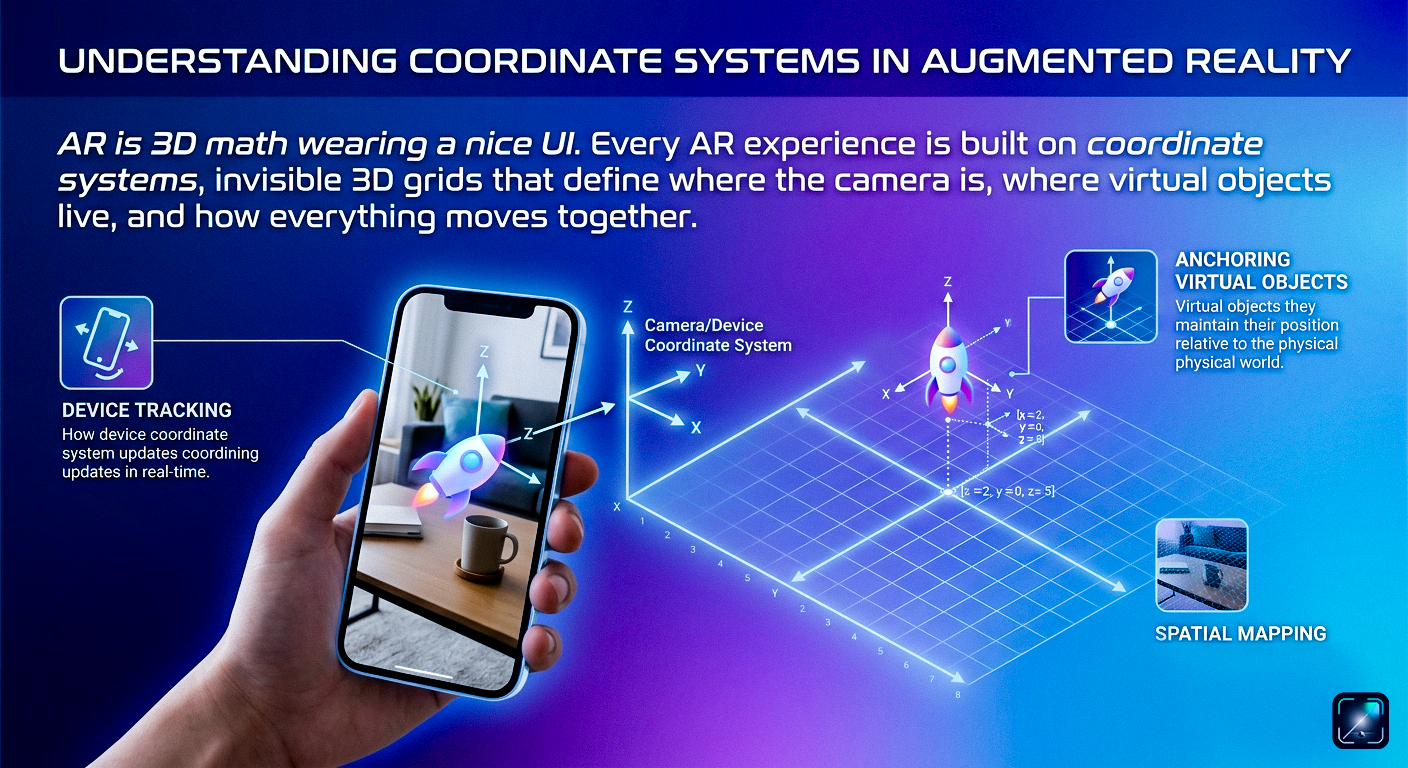
Coordinate Systems in AR
3D Coordinate Systems

World, Camera & Screen Frames with Euler & Quaternions.

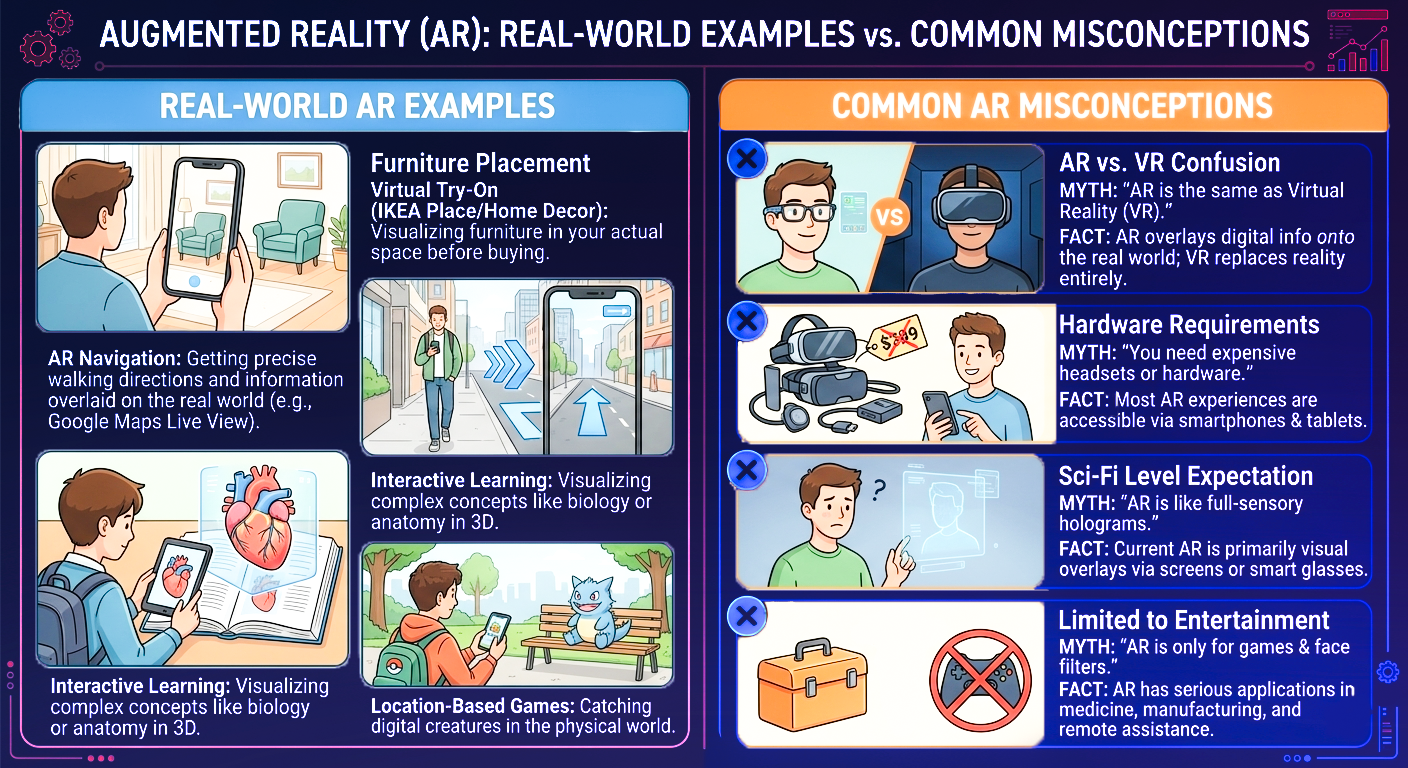
Real World Examples vs Misconceptions
Real World vs Myths

Demystifying screen overlays versus true 3D spatial registration.

Air-Gapped Execution.
Zero External Dependencies.

Your engineering training environment should never be gated behind an internet connection, third-party authentication, or telemetric data harvesting. AR Explorer is completely self-contained.

  • Deterministic Local Runtime

    Deploy anywhere: cleanrooms, aircraft, transit, or remote facilities. All 9 modules, code exercises, and simulators execute purely on-device.

  • Zero Account Overhead

    Zero credentials to manage, no telemetry collection, and no subscription paywalls. Instant access to full engineering documentation.

  • Data Sovereignty

    Your technical notes, benchmarks, quiz scores, and progression telemetry remain strictly within on-device encrypted storage.

Everything You Need to Know
About AR Explorer

Answers to common questions about our curriculum, interview prep, offline support, and certifications.

What is AR Explorer and who is it for?

+
AR Explorer is an interactive mobile learning platform designed for software engineers, university students, game developers, and tech professionals looking to master Augmented Reality and Spatial Computing. It covers everything from fundamental spatial definitions (Azuma's 3 Pillars) to complex SLAM mathematics, OpenXR standards, and mobile 60 FPS performance optimization.

How does AR Explorer prepare me for XR technical interviews?

+
The app features a specialized Interview Simulator with 50+ technical questions modeled after real interviews at spatial computing and gaming studios. It includes timed mock assessments (5 minutes per question category), attempt penalty mechanics, category-by-category accuracy radar, and in-depth rationales with mathematical proofs (such as Quaternion SLERP vs Euler Gimbal Lock).

Can I use the app completely offline?

+
Yes, AR Explorer is built 100% offline-first. All 9 curriculum modules, interactive code exercises, flashcard decks, quizzes, and high-fidelity infographics are bundled inside the app. You can study on flights, subways, or off-grid without any Wi-Fi or cellular connection.

What SDKs, engines, and standards are covered?

+
AR Explorer covers Khronos OpenXR, Unity AR Foundation, Apple ARKit, Google ARCore, Vuforia Engine, WebXR Device APIs, and Flutter AR integrations using PlatformViews and MethodChannels.

How do the tiered certifications work?

+
Learners unlock Bronze, Silver, Gold, and Platinum credentials as they progress through curriculum milestones, score high on module quizzes, and conquer hands-on code challenges. Certificates can be exported to high-resolution images or PDF documents to showcase on LinkedIn or in portfolio resumes.

Is an account or subscription required?

+
No account, email, or sign-in is required to use AR Explorer. All progress, quiz scores, XP, and bookmarks are stored securely on your local device. The core learning curriculum is completely free to access.
Deploy AR Explorer to
Your Hardware Today

Install the complete spatial computing curriculum on Google Play. Zero subscriptions or paywalls required to master the foundational pillars of augmented reality.

Install on Google Play